Printing & beauty kiosks
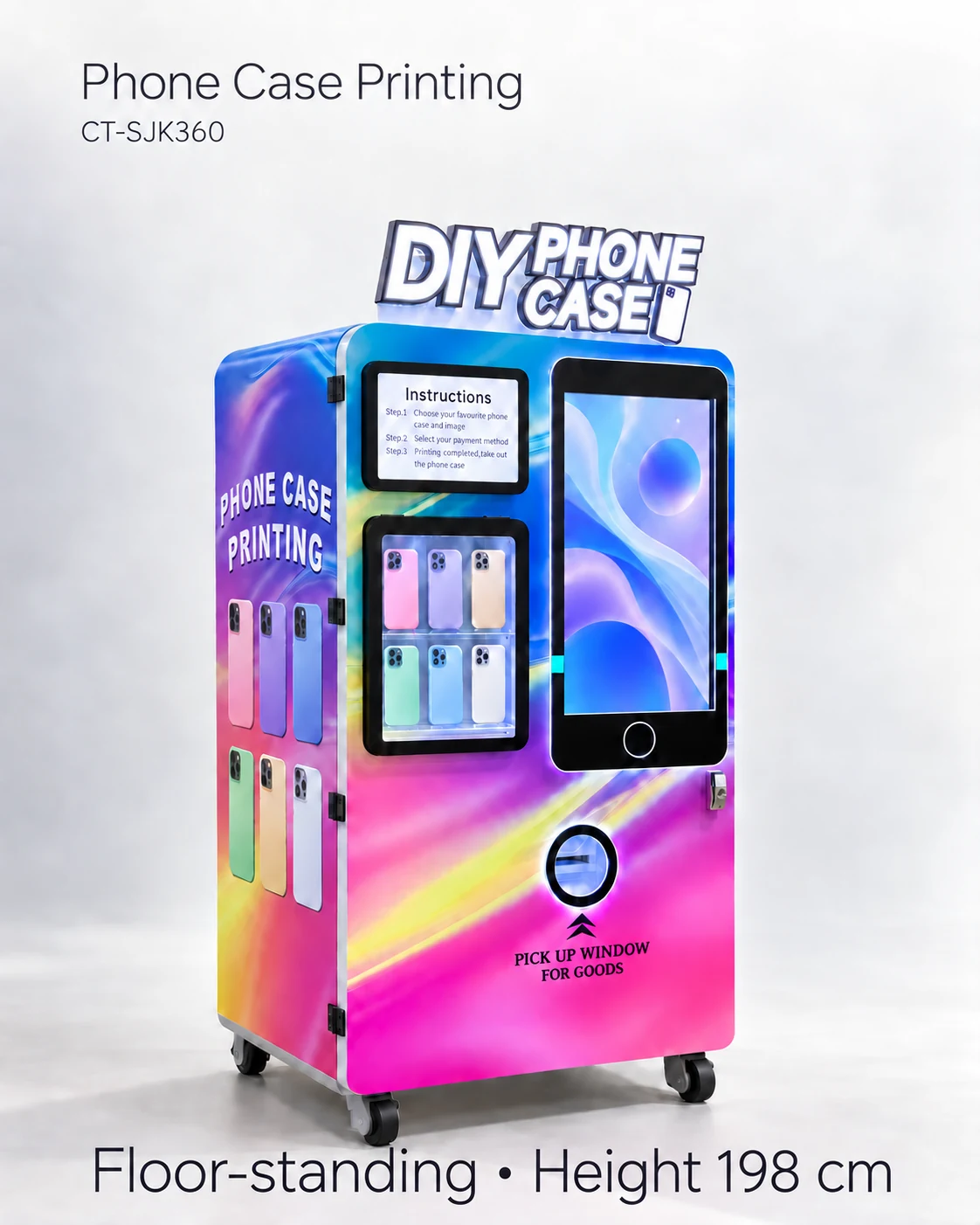
Phone Case Vending Compartments: Test Blank Picking and Stock Mapping
Check that each selected phone model maps to the right compartment and physical blank; test low stock, refill changes and authorised pick recovery.
Treat every compartment assignment as a product identity
Accept a phone case vending compartment only when its physical blank, stock code and customer-visible device model match, and the quoted machine retrieves that blank correctly. Test representative formats, low stock and an approved refill change before treating the displayed inventory as reliable.
Assign a stock code to each accepted arrangement and photograph the loaded position. Case thickness, packaging and loading direction can differ across the assortment. Keeping these variations in the map makes refill work easier and gives each selection test a clear physical target.
Build a compartment-to-case mapping sheet
Number the compartments using the supplier system and keep that numbering consistent in the software, refill instructions and physical photographs. For each position, record the accepted blank, loading direction and usable quantity shown during the demonstration. Ask which configurations are fixed and which can be changed by authorised staff.
Demonstrate a selection from more than one area of the cabinet. Compare the requested model, software stock code and delivered blank. Record mismatches as order-flow failures even when the blank reaches the printer successfully. Correct identity matters as much as movement.
- Mapping columns: compartment ID; case stock code; customer-facing model name; loading orientation; demonstrated quantity.
- Selection check: requested model; commanded compartment; actual picked blank; sample fit result; order reference.
- Refill check: operator identity; previous stock; stock added; software change; physical count; exception notes.
Test low stock and a refill change
Low stock changes the customer offer. The selection screen, physical stock and refill record need to stay aligned when a position becomes empty and when it is replenished. Establish whether the quoted version uses sensors, entered counts or another stock method, then include that method in the refill instructions.
Hypothetical example: a position is changed from one phone model to another during a pilot. The previous map, new blank code and updated screen label form one change record. A selection test after the authorised update connects the new display choice with the case in that position.
Include recovery evidence in the demonstration
Agree with the supplier how a failed pick, incorrect blank or interrupted selection will be simulated safely. Preserve messages and order states for the responsible technician. Avoid opening guards or reaching into a moving mechanism. Recovery should follow the exact authorised instructions and training boundary.
Ask what happens to the stock count after an interrupted pick and whether an order can be retried without consuming a second blank or charging again. The acceptance record should distinguish a demonstrated behaviour from an answer awaiting verification. This is particularly useful when a printer and vending mechanism have separate controllers.
Compartment acceptance row
Record: position ID; loaded blank code; displayed device name; loading direction; demonstrated usable quantity; selected order; delivered blank; final physical and software count. Rerun the affected row after a stock-code or position change under the supplier procedure.
Freeze the initial assortment configuration
Include the accepted mapping sheet in the purchase specification, with the approved blanks and any limits. Request spare parts and instructions using the installed mechanism identity. Plan staff training around a real refill exercise so operators can find the correct position and detect a mismatch.
The initial map becomes the reference for opening stock, staff training and later device additions. When a new phone model joins the assortment, its accepted blank, position and customer label can follow the same record instead of creating a separate informal refill rule.
CHECK THE REFERENCES
Sources
- Automatic Phone Case Printing Vending Machine reference configuration
Model reference and supplier-listed configuration.
PUT THE GUIDE TO WORK
Confirm compartment compatibility
Send blank dimensions, stock codes and the proposed device-model assortment. Request a compartment map and picking tests for representative cases and low-stock conditions.
Build my equipment brief